Appearance
Clients
Each client is a thin library over the API: one call per operation, with the same names in every language. Your product shows its own Report a problem screen and calls the library. The one piece of UI each client brings is the screenshot editor, where the user blacks out what they don't want to send.
| TypeScript | the browser and Node, typed |
| Godot 4 | an addon in GDScript, on native builds and on the web |
| Swift | iOS and macOS, with SwiftUI views to drop in |
| The standalone reporter | a program beside your product, for when it can't report itself |
| C#/.NET (Unity), Kotlin, Unreal | planned |
The clients and tools are MIT-licensed and published on alias-releases: TypeScript as npm install alias-support, Swift as a package from that repository, and the Godot addon, aliasctl, alias-agent and alias-reporter as downloads on each of its releases.
Every client:
- asks the service for the user's identity the first time it's needed, and keeps it;
- sends reports with a screenshot and other attachments, in plain text or Markdown, adding your product's context and telemetry from callbacks;
- applies your product's redaction rules before anything leaves the device, with your own strategies if you register them, and shows the user what will be sent, taking out the fields they may remove;
- has a screenshot editor: solid boxes and a brush, no blur, the result re-encoded so no metadata survives;
- watches for answers, over a stream where it can and by polling otherwise, and tells you about each answer once;
- gives and withdraws the user's contact;
- makes and claims transfer codes;
- gets the user's copy of their data, and erases it.
TypeScript
ts
import { AliasClient, LocalStorageIdentityStore } from 'alias-support'
import { openRedactor } from 'alias-support/redact'
const alias = new AliasClient({
url: 'https://support.example.com',
key: PRODUCT_KEY,
appVersion: '1.4.2',
store: new LocalStorageIdentityStore(), // keep the identity between visits
context: () => ({ level: game.level }),
telemetry: () => ({ fps: game.fps }),
})
const preview = await alias.previewTelemetry() // what will be sent; preview.removable: what the user may untick
const ticket = await alias.report({
note: "The door won't open, see ",
format: 'text/markdown',
attachments: [{ name: 'door.jpg', data: await openRedactor(await canvasJpeg()) }, { name: 'game.log', data: log }],
remove: unticked, // of preview.removable
})
const stop = alias.watch((u) => toast(`Support answered #${u.ticket}`))- Calls:
getProduct,identity,me,report,tickets,ticket,reply,attachment,updates,watch,getContact,setContact,withdrawContact,newTransfer,claimTransfer,useIdentity,myData,eraseMe,forget; andproduct()(cached),previewTelemetry. - Redaction: automatic in
reportandreply(redact: falseturns it off);redact,removePathsandregisterRedactor('name', fn)for aclient:namestrategy of your own. - The editor is a separate import for browsers,
alias-support/redact:openRedactor(image)resolves to the redacted image as aBlob, ornullif the user cancelled. Its labels can be translated. - Markdown is yours to render: never raw HTML, and images only from the report's own attachments (
attachmentRefslists them). - Errors are thrown as
AliasError, carrying the status and the service's reason: a telemetry schema mismatch says which field. - Screenshots can be bytes, a
Blobor base64. - Identity stores: in memory,
localStorage, or your own (load,save).
Godot
gdscript
var alias := AliasSupport.new()
alias.url = "https://support.example.com"
alias.key = PRODUCT_KEY
alias.app_version = ProjectSettings.get_setting("application/config/version")
alias.context_provider = func() -> Dictionary: return {"level": level_name}
alias.telemetry_provider = func() -> Dictionary: return {"fps": Engine.get_frames_per_second()}
add_child(alias)

var redactor := AliasRedactor.new()
redactor.open(self, get_viewport().get_texture().get_image())
var shot = await redactor.finished          # the redacted Image, or null if cancelled

var r: Dictionary = await alias.report("The door won't open", shot, null, null,
	[{"name": "game.log", "data": FileAccess.get_file_as_bytes("user://game.log")}], "text/markdown")
if not r.ok:
	show_error(r.error)

alias.answered.connect(func(u: Dictionary): notify("Support answered #%d" % u.ticket))
alias.watch()- Calls: the same as the TypeScript client's, in snake_case (
get_product,report,claim_transfer…). Each is a coroutine returning{ok, status, data, error}. - Attachments are
{name, data}, the data anImage(sent as a JPEG) or bytes; a screenshot alone can be anImageor JPEG bytes. - Redaction: automatic in
reportandreply;preview_telemetry()andremove_pathsfor the user's choice;AliasRedact.register_redactor(name, callable)for your own strategy (unregister it withCallable()before your object goes). - Markdown:
AliasMarkdown.render(label, text, format, texture)fills aRichTextLabelwith BBCode, the user's text escaped so a note can't inject tags; links only http, https and mailto; images only the report's own attachments. - The identity is kept in
user://, under a name of your choice, so one game can talk to several products. It's never made on the device: the service makes it from a secure random source, whatever the platform has. - Answers: native builds keep a stream open and also poll. Web builds poll only.
- Signals:
answeredandidentity_changed.
Swift
swift
// Package.swift: .package(url: "https://github.com/emdzej/alias-releases", from: "0.4.0")
import AliasSupport
import AliasSupportUI

let alias = AliasClient(
  url: URL(string: "https://support.example.com")!, key: productKey,
  store: KeychainIdentityStore(account: "road-builder"),   // the Keychain, this device only
  appVersion: "2.3.1",
  context: { ["level": .string(level.name)] },
  telemetry: { ["fps": .number(fps)] })

// the sheet: a report with the screenshot the user can black out first, and their reports with the answers
.sheet(isPresented: $reporting) { AliasSupportView(client: alias, screenshot: screenshot) }

// or your own screen, over the client
let ticket = try await alias.report("The door won't open", Extras(screenshot: redactedJPEG, remove: unticked))
for await u in await alias.watch() where u.kind == "answer" { notify("Support answered #\(u.ticket)") }- Calls: the same as the other clients', in Swift's style (
getProduct,report,reply,claimTransfer…), eachasync throws. The client is an actor, safe to share. - Two libraries:
AliasSupport, the client alone (Foundation, CryptoKit, Security);AliasSupportUI, the SwiftUI views:AliasSupportView(the sheet),AliasReportView,AliasTicketsView,AliasTicketView,AliasRedactorView. Their words are anAliasLabels, yours to translate. - The editor draws solid boxes and a brush, and gives a new JPEG drawn from the pixels: no EXIF, no location, no device. A screenshot sent unedited is re-encoded the same way.
- The identity lives in the Keychain. Give it an
accessGroupyour apps share, and a second app of yours uses the same identity. - Answers:
watch()is anAsyncStream, from the stream while the app's in the foreground (cancel it in the background; the views do), polled otherwise. Live mode, typing and read come the same way. - Markdown:
aliasText(text, format:), inline only, links only http, https and mailto, no images. - Errors are
AliasError, with the status and the service's reason;keyRevokedand support'sreasonfor a revoked build.
The standalone reporter
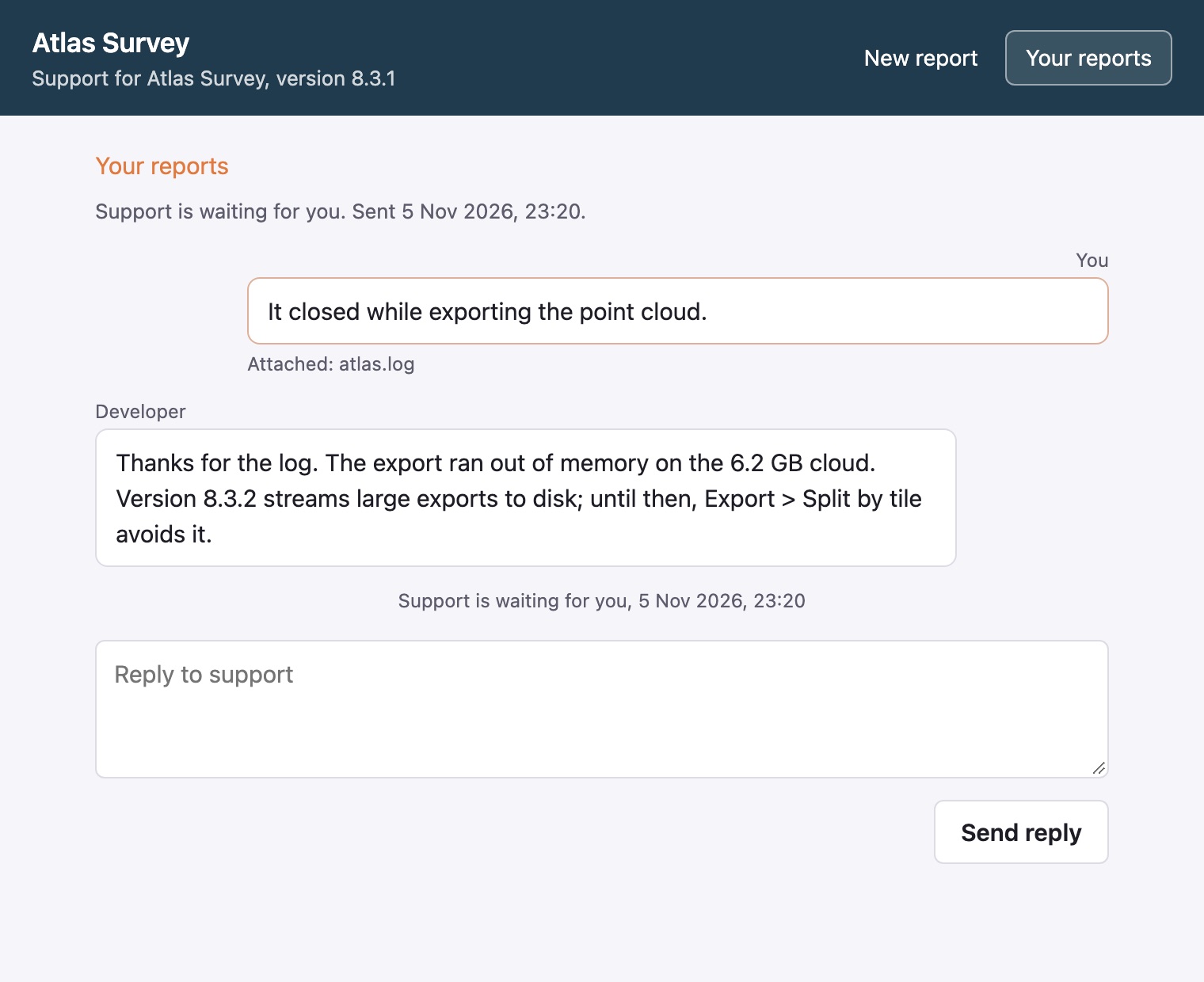
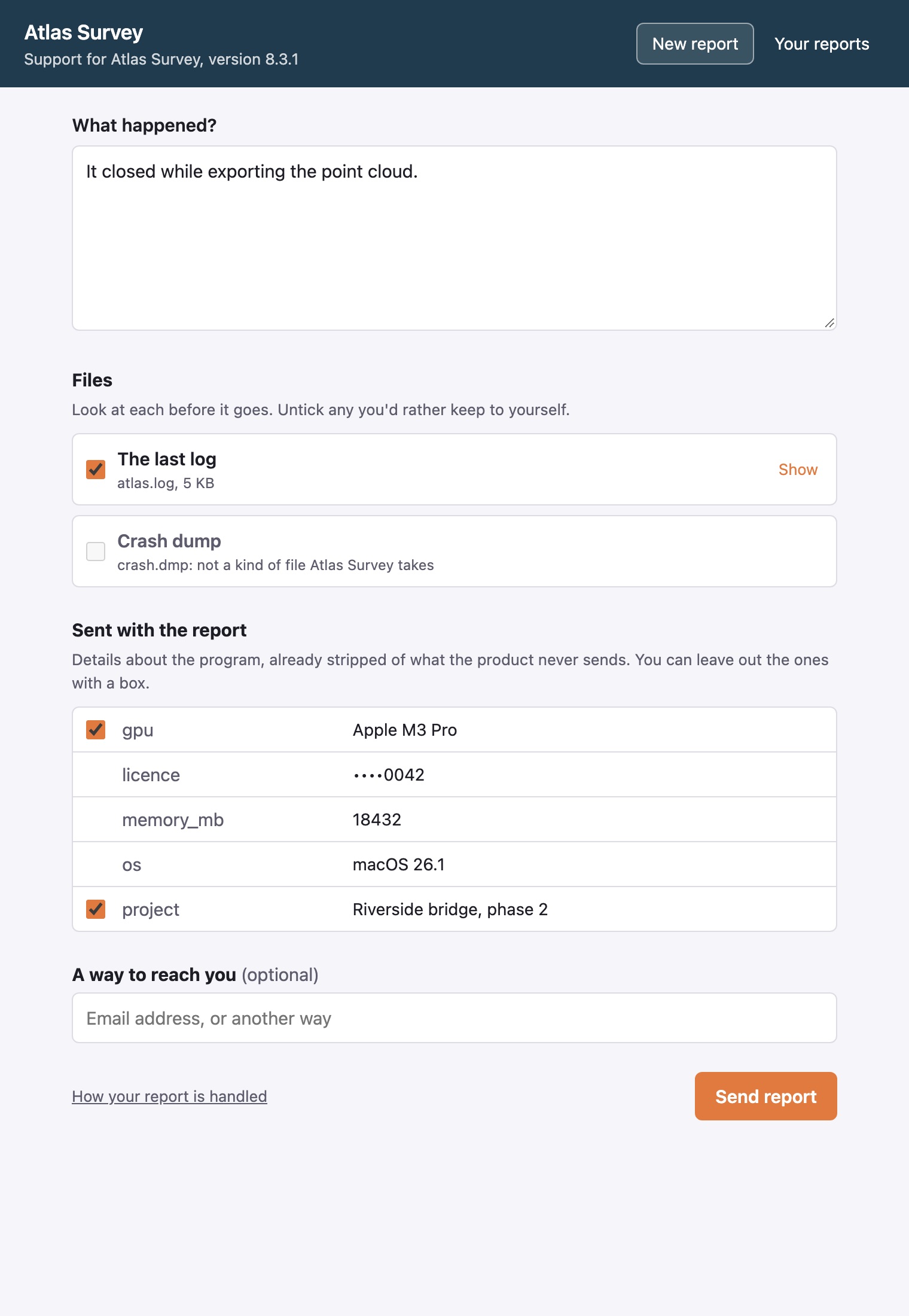
For when your product can't show its own Report a problem screen: it crashed, it won't start, or it has no UI (a service, a tool run from scripts). alias-reporter is a small program installed beside it. Your crash handler, your installer's shortcut or the product's Help menu starts it. The user says what happened, looks at each file you name (the last log, a crash dump) and keeps or unticks it, sees what goes with it after your redaction rules, and can leave a way to reach them. Their reports and support's answers are there too, so they can follow up while the product is still down.
toml
# alias-reporter.toml, next to the program (or in the user's config dir, or -config)
url = "https://support.example.com"
key = "alias_..."                          # the product's key
app = "Atlas Survey"                       # the window's title
app_version = "8.3.1"
identity = ""                              # "": <config dir>/alias/<host>/<product>.json
telemetry = "~/.atlas/state.json"          # a JSON object the product leaves; context likewise
[[files]]
label = "The last log"
path = "~/Library/Logs/Atlas/*.log"        # a glob: the newest match
max_bytes = 1048576                        # a text over it: its end is sent
sh
alias-reporter -note "Atlas stopped during an export" -file "$CRASH_DUMP"   # from a crash handler
alias-reporter -tickets # the user's reports- The files are read by the reporter, never by the page. A file is checked against the kinds your product takes, by the service's own rule, so one it would refuse is shown with the reason and not sent. A log over its
max_bytesis cut to its end, from a line's start. - Redaction: your product's rules run before anything is sent, as in every client. The service applies them again, with
hashleft to it. - The window is a page on 127.0.0.1 that only the reporter serves: a random port, a launch token used once for a cookie, the Host header checked, writes only from the page, and a strict Content Security Policy. The page talks only to the reporter, and the reporter talks to the service. The binaries on alias-releases open it in the default browser and need no other libraries. Built with
-tags webview, it gets a window of its own in the system's web view (WebKit on macOS, WebKitGTK on Linux, WebView2 on Windows; this needs CGO). - The identity is kept in a JSON file (
{"id", "secret"}). If your product's client keeps its identity in a file of that shape, pointidentityat it and the two are one user, with one thread. - Answers are polled while the window is open. In the browser, the reporter stops a couple of minutes after the tab is closed, or when the user presses Close.