

Appearance
Users and their data
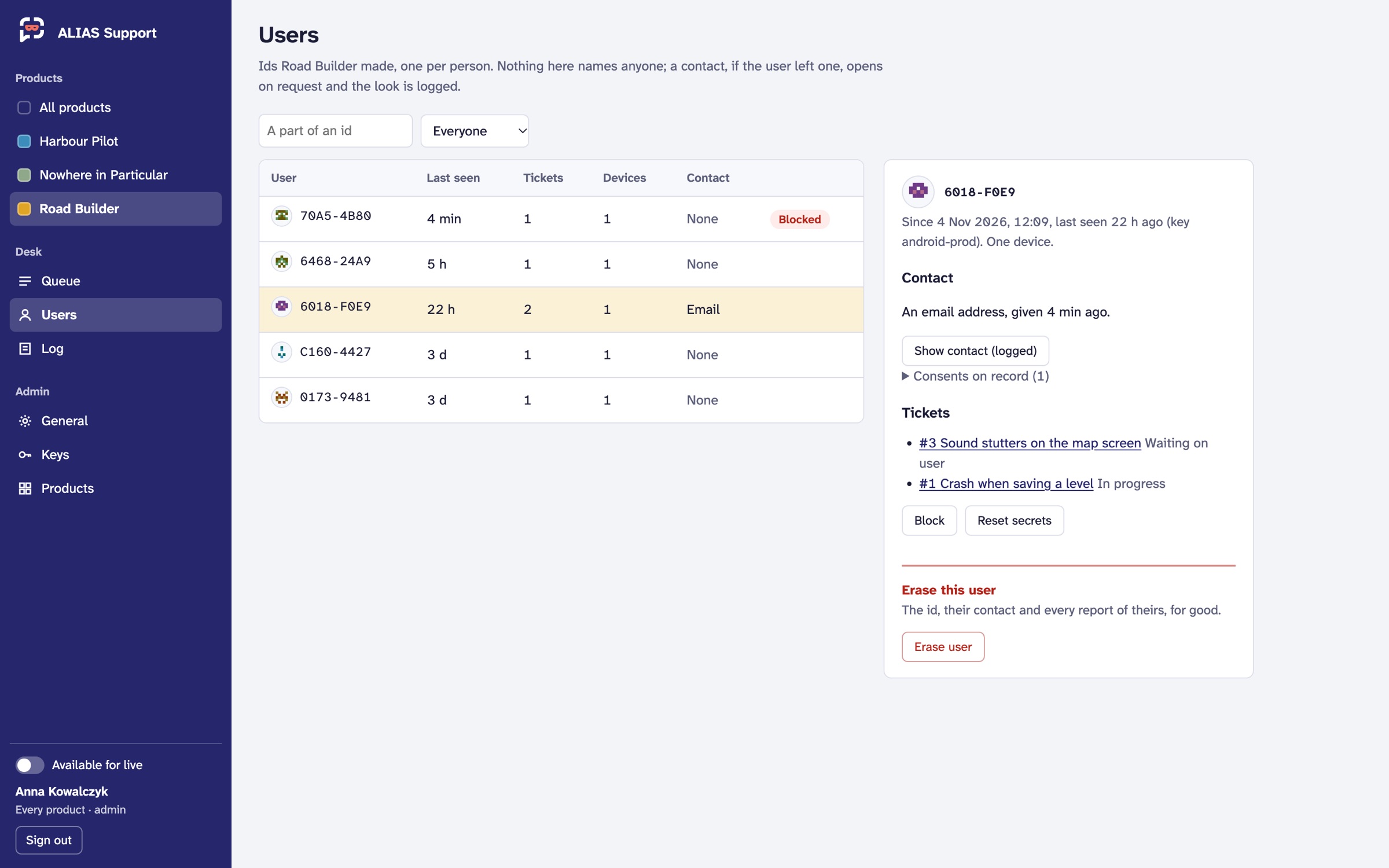
A user is an id the service made, shown as a short code and a glyph. There's no name, no account and no address unless they chose to leave a contact. Users lists them, with when each was last seen, their tickets, devices and whether there's a contact. Search by a part of the id, or show only the blocked.
 Demo data.
A user's card
- Contact: hidden until you ask. Show contact (logged) shows it, marked Unverified, with the text they agreed to. That look is in the log under your name. It needs
contacts.view. - Consents on record: each consent they gave, and when they withdrew it.
- Tickets: all of theirs.
What you can do
| Block | the service refuses them everything (their product hears that support isn't available to them), until Unblock. Needs users.block |
| Reset secrets | every device of theirs is signed out, and the product gets a new secret the next time, with the same id (a device that was taken, say). Needs users.block |
| Erase user | the id, its reports, attachments and contact deleted at once, for good. You type a short code to confirm. Needs users.erase |
Users can do the same for themselves from your product: take a copy of everything kept about them, move to another device with a short code, and erase it all. The privacy text describes exactly this.